This post walks through building a Slack bot that responds to a /cat slash command with cat facts. The bot is built with Project Flogo, runs on AWS Lambda, and is exposed through API Gateway. The whole thing takes about 15 minutes to set up.
Prerequisites #
Before getting started, make sure you have:
- Git
- The Flogo CLI (
go get -u github.com/TIBCOSoftware/flogo-cli/...) - An AWS account with access to Lambda and API Gateway
If you want to tweak the app before deploying, you can use the Flogo Web UI:
docker run -it -p 3303:3303 flogo/flogo-docker:latest eula-acceptJust make sure to also install the QueryParser activity.
Clone the repo #
git clone https://github.com/retgits/flogo-slackbot
cd flogo-slackbot
What the bot does #
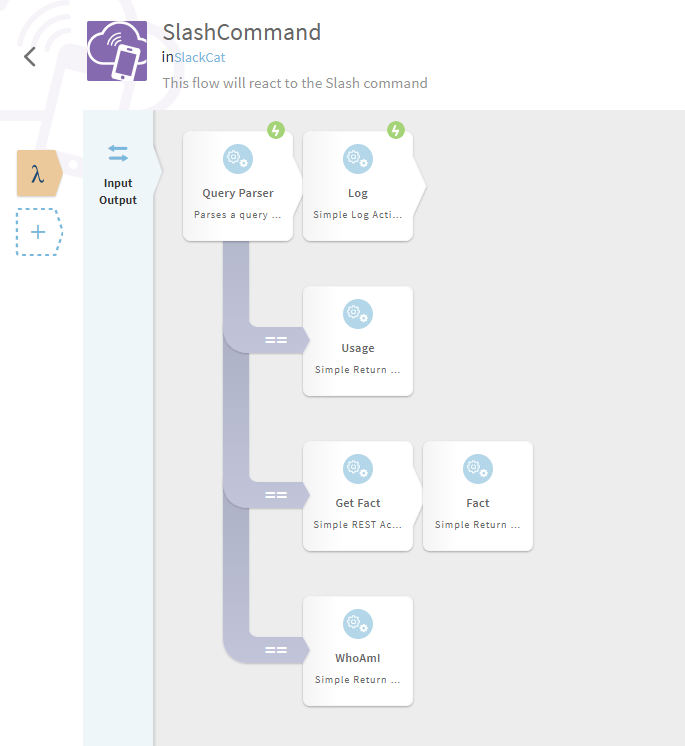
The bot responds to a /cat slash command in Slack. Depending on what you type after /cat, it takes one of three branches:
/cat usage— shows available commands/cat fact— fetches a random cat fact and posts it in the channel/cat whoami— responds with your Slack username
If you load slack_cat.json into the Flogo Web UI, the flow looks like this:
The text responses are defined on these lines in the JSON:
- usage: line 121
- fact: line 156
- whoami: line 173
Feel free to customize those before building. Once you’re done, export the app from the Flogo Web UI.
Build the executable #
Turn the JSON flow into a Lambda-ready binary:
# Create the app structure
flogo create -f slack_cat.json -flv github.com/TIBCOSoftware/flogo-contrib/action/flow@master slackcat
cd slackcat

# Build for Lambda
flogo build -e -shim lambda_trigger
Test locally with SAM (optional) #
You can test the bot locally using the AWS SAM CLI before deploying to AWS.
The sam folder contains a SAM template (YAML) and six JSON test events — two per command (one simple, one simulating API Gateway):
usage.json/apiusage.jsonfact.json/apifact.jsonwhoami.json/apiwhoami.json
To run a local test:
cd sam
cp ../src/slackcat/handler ./handler
sam local invoke "SlackCat" -e apifact.json
The output will look something like:
{"statusCode":200,"headers":null,"body":":wave: <@sam>, did you know that Polydactyl cats are also referred to as \"Hemingway cats\" because the author was so fond of them."}I genuinely didn’t know that about Hemingway and polydactyl cats. 😸
Deploy to Lambda #
There are plenty of ways to deploy to Lambda, but doing it manually helps you see what the automation frameworks do under the hood.
- In the Lambda console, click “Create function”
- Configure it:
- Name:
SlackBot - Runtime: Go 1.x
- Role: Choose an existing role →
lambda_basic_execution
- Name:
- Click “Create function”
- In the Function code section, upload
src/slackcat/handler.zip - Set the Handler field to
handler(replace the defaulthello) - Click “Save”

To test from the console, create a test event using any of the JSON files from the sam folder.
Set up API Gateway #
The bot needs to be reachable from the internet, so we add an API Gateway trigger.
- In the Lambda function config, find “Add triggers” and select “API Gateway”
- Use these settings:
- API: Create a new API
- API name:
SlackBot - Deployment stage:
dev - Security: Open
- Click “Add”, then “Save”
A note on security: the “Open” setting is fine for testing, but you’ll want to lock this down before using it for real.
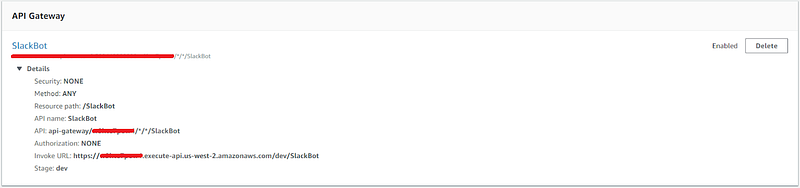
After saving, expand the API Gateway section to find your Invoke URL — you’ll need it for the Slack configuration.
Create the Slack app #
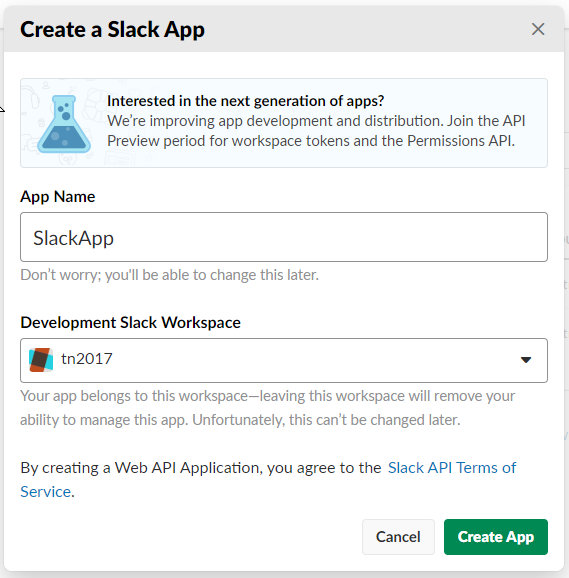
Head to https://api.slack.com/apps and click “Create New App.”

Give it a name, pick a workspace, and click “Create App.”
Now set up the slash command:
- Click “Slash Commands” → “Create New Command”
- Configure:
- Command:
/cat - Request URL: your API Gateway Invoke URL
- Short Description:
:cat: - Usage Hint:
usage
- Command:
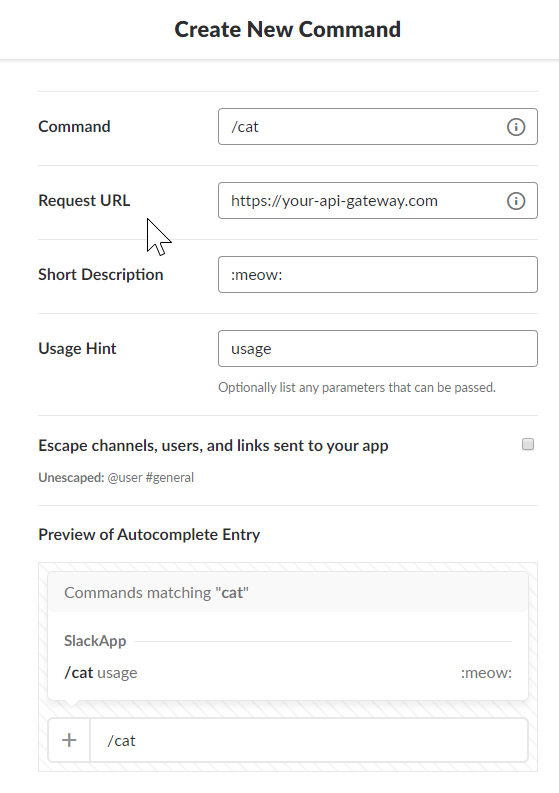
- Click “Save”
- Go to “Install App” → “Install App to Workspace” → “Authorize”
Try it out #
At this point you should have:
- A Flogo app deployed to Lambda
- An API Gateway exposing it
- A Slack slash command pointing to the gateway
Type /cat fact in any channel and see what you get.

Again, I had no idea. 🙀
If you build something fun with Flogo or have questions, feel free to reach out.