As Auth0 says on their website “Identity is the front door of every user interaction”. When you’re building serverless applications, that becomes even more important since you often have multiple apps that all need to be secured. In this post I’ll walk you through how to wire up Auth0 with Akka Serverless.
TL;DR all code is avaialble on GitHub too: https://github.com/retgits/akkaserverless-auth0-javascript
Prerequisites #
To follow along, you’ll need:
- An Akka Serverless account
- Node.js v14 or higher installed
- The Docker CLI installed
- An account with Auth0
Your service #
The plan is straightforward: build a “Hello, World” Action that validates a JWT token and returns either an error (HTTP 500) or a normal response.
Proto file #
Akka Serverless is API-first, so we start with the API description in Protobuf format:
syntax = "proto3";

package com.retgits.akkaserverless.actions;

import "akkaserverless/annotations.proto";
import "google/api/annotations.proto";

message GreetingRequest {
    string name = 1;
    string greeting = 2;
}

message GreetingResponse {
    string message = 1;
}

service GreetingService {
    /**
     * The Greeting method accepts a GreetingRequest message and returns a
     * GreetingResponse message if the function completes successfully. The
     * method is exposed to the outside world over HTTP on the URL `/greet`
     */
    rpc Greeting(GreetingRequest) returns (GreetingResponse) {
        option (google.api.http) = {
            post: "/greet"
            body: "*"
        };
    }
}
Next, we need a class to handle JWT validation:
import jwksClient from 'jwks-rsa';
import jwt from 'jsonwebtoken';

class JWTValidator {
    header
    client

    /**
     * Creates an instance of JWTValidator
     * @param {string} header the name of the header parameter that contains the JWT token
     * @param {string} uri the URI to find the JWKS file
     */
    constructor(header, uri) {
        this.header = header;
        this.client = new jwksClient.JwksClient({
            jwksUri: uri
        });
    }

    /**
     * Validate and decode the JWT token
     * @param {*} metadata the metadata of the Akka Serverless request
     * @returns a decoded JWT token
     * @throws an error when decoding fails
     */
    async validateAndDecode(metadata) {
        const jwtHeader = metadata.entries.find(entry => entry.key === this.header);
        const token = jwtHeader.stringValue;

        let result = jwt.decode(token, { complete: true });
        if(result == null) {
            throw new Error('Unable to obtain valid JWT token')
        }

        const kid = result.header.kid;

        if(this.client == null) {
            throw new Error('To validate with JWKS the withJWKS method must be called first')
        }
        const key = await this.client.getSigningKey(kid);
        const signingKey = key.getPublicKey();

        try {
            var decoded = jwt.verify(token, signingKey, { complete: true });
            return decoded
        } catch (err) {
            throw new Error('Unable to verify JWT token');
        }
    }
}

export default JWTValidator;
And finally, the action implementation itself:
import as from '@lightbend/akkaserverless-javascript-sdk';
import JWTValidator from './jwtvalidator.js';

const greetingservice = new as.Action(
    ['./app.proto'],
    'com.retgits.akkaserverless.actions.GreetingService',
    {
        serializeFallbackToJson: true
    }
);

/**
 * The command handlers for this Action.
 * The names of the properties (before the colon) must match the names of the rpc
 * methods specified in the protobuf file.
 */
greetingservice.commandHandlers = {
    Greeting: generateGreeting
}

/**
 * generateGreeting implements the business logic for the Greeting RPC method. It
 * validates the JWT token passed in the `X-Custom-JWT-Auth` HTTP Header parameter
 * first and if that succeeds, sends back a message. If the validation fails. an
 * HTTP 500 error is sent back.
 * @param {*} request
 * @param {*} context
 */
async function generateGreeting(request, context) {
    const validator = new JWTValidator('X-Custom-JWT-Auth', 'https://<your tenant>.auth0.com/.well-known/jwks.json');
    try {
        await validator.validateAndDecode(context.metadata);
        return {
            message: `${request.greeting}, ${request.name}!`
        }
    } catch (err) {
        return context.fail(err);
    }
}

export default greetingservice;
The first line of generateGreeting is the important bit. It initializes the JWT validation class with two parameters:
- The name of the HTTP Header parameter that carries the JWT token
- The URL to the JWKS file in Auth0
const validator = new JWTValidator('X-Custom-JWT-Auth', 'https://<your tenant>.auth0.com/.well-known/jwks.json')Security #
Building the service was pretty standard. Securing it with Auth0 is equally straightforward.
In the Auth0 console, go to Applications -> APIs:
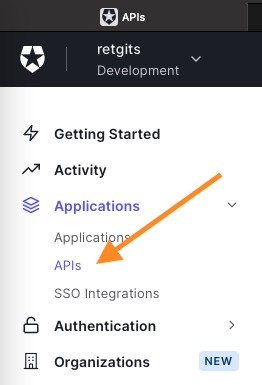
Click + Create API to create a new API. The name and identifier are up to you, but the Signing Algorithm should be set to RS256 so tokens get signed with Auth0’s private key. Once the API is created, Auth0 also creates a Test Application. On the Test tab, you can request tokens for any of your authorized applications (like the default Test Application). The response section will contain the access_token.
Testing it #
To test locally, you need to run the Akka Serverless proxy alongside your service container:
## Set your dockerhub username
export DOCKER_REGISTRY=docker.io
export DOCKER_USER=<your dockerhub username>

## Run the npm install command
npm install

## Build container
docker build . -t $DOCKER_REGISTRY/$DOCKER_USER/akkaserverless-auth0-javascript:1.0.0

## Create a docker bridged network
docker network create -d bridge akkasls

## Run your userfunction
docker run -d --name userfunction --hostname userfunction --network akkasls $DOCKER_REGISTRY/$DOCKER_USER/akkaserverless-auth0-javascript:1.0.0

## Run the proxy
docker run -d --name proxy --network akkasls -p 9000:9000 --env USER_FUNCTION_HOST=userfunction gcr.io/akkaserverless-public/akkaserverless-proxy:0.7.0-beta.9 -Dconfig.resource=dev-mode.conf -Dcloudstate.proxy.protocol-compatibility-check=false
With the access_token from Auth0, you can call the service:
## Set your Access Token
export ACCESS_TOKEN=<your access token>

## Send a request
curl --request POST \
  --url http://localhost:9000/greet \
  --header 'Content-Type: application/json' \
  --header 'X-Custom-JWT-Auth: '$ACCESS_TOKEN'' \
  --data '{
    "name": "World",
    "greeting": "Hello"
}'

## The result will be
{"message":"Hello, World!"}
If you change the token to anything else, you’ll get an error:
Error: Unable to obtain valid JWT tokenWhat’s next? #
That’s really all there is to it. Securing Akka Serverless apps with Auth0 comes down to a JWT validation class and a few lines of configuration. Let me know what you’d like to see next!
Cover photo by vishnu vijayan from Pixabay