Not too long ago Flogo introduced a new Go API that allows you to build event-driven apps by simply embedding the Flogo engine in your existing Go code. Now you can use the event-driven engine of Flogo to build Go apps while using the activities and triggers that already exist and combining that with “regular” Go code. In one of my other posts, I built an app that could receive messages from PubNub and for this post, I’ll walk through building the exact same using the Go API.
Note: I realize that certain pieces of the code aren’t as optimized as they could be, but I wanted to keep the flow similar to what I did with the Web UI
To run this example you’ll need to have Go installed and execute these commands from where you created the file with the source code (which will have to be in your $GOPATH)
Get all the dependencies
#If you already have Flogo or the Flogo CLI, you can skip thesego get -u github.com/TIBCOSoftware/flogo-contrib/activity/loggo get -u github.com/TIBCOSoftware/flogo-lib/core/datago get -u github.com/TIBCOSoftware/flogo-lib/enginego get -u github.com/TIBCOSoftware/flogo-lib/flogogo get -u github.com/TIBCOSoftware/flogo-lib/logger

# You will need to go get these :)
go get -u github.com/retgits/flogo-components/activity/writetofile
go get -u github.com/retgits/flogo-components/trigger/pubnubsubscriber
Generate the metadata
The Flogo engine needs a bit of metadata, and to generate that the line at the top of the file needs to be executed. To do that, simply run the command below:
go generateBuild and run
Now that the “hard” part is done, you can build the app like you would do for any Go app:
go build./pubnub-appTesting it out #
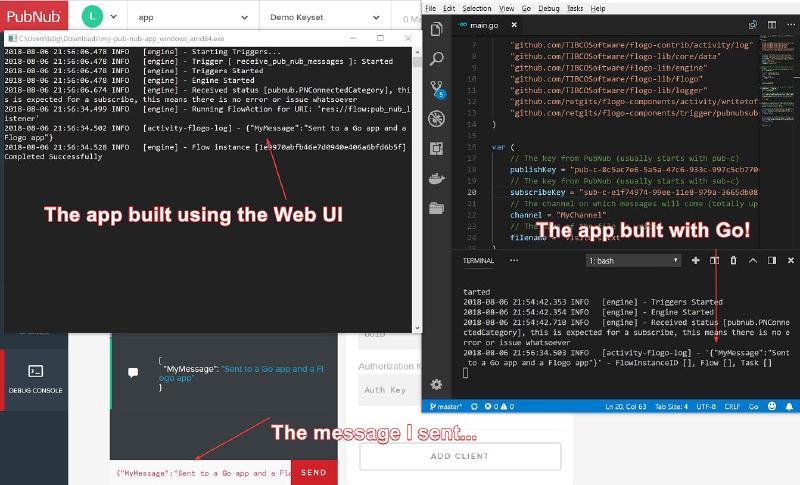
If you’re testing it out in the same way as I did in my last post, you’ll see the same the same status messages come by as in the example with the Web UI and when you test the app in the exact same way, you’ll see that both apps will receive the same message!
No matter if you’re a Go developer or someone who builds microservices visually (through a very cool Web UI), you can do it using Flogo! If you’re trying out Flogo and have any questions, feel free to join our Gitter channel, create an issue on GitHub or even drop me a note on Twitter. I’d also love to get your feedback if you thought this was helpful (or not).
Originally published on hackernoon.com